Quick answer
In the Messenger app: Menu > Settings > See more in Accounts Center > Your information and permissions > Export your information > Create export, pick your profile, then Export to device > Start export. Messenger-only account (Facebook deactivated): on messenger.com, click your profile picture > Preferences > Export your information > Create export.
Does this match what you see?
- You want a backup of your Messenger conversations.
- You’re about to deactivate or delete Facebook and want your messages first.
- You use Messenger without Facebook and can’t find the download option.
AndroidiPhone & iPadComputer (browser)
Based on Meta’s Messenger Help page “Request a copy of your Messenger data” (computer, iPhone and Android versions, supplied by the site owner on November 7, 2026). Meta may show Meta Account instead of Accounts Center.
Why this happens: the possible causes
Where to go, depending on your account.
| Your situation | Where |
|---|---|
| Using the Messenger app | Menu > Settings > Accounts Center > Export your information |
| On a computer | The Export your information tool in Accounts Center |
| Facebook deactivated, Messenger still on (DEMA) | messenger.com > Preferences > Export your information |
- The option moved to Accounts CenterCheck this first
Meta keeps data exports in Accounts Center, not in Messenger’s own settings list.
Try these 60-second checks first
- Know your Facebook password: Meta asks for it when exporting to another service.
- Use Wi-Fi for large exports.
How to fix it, step by step
Work through these in order. They start with the quickest, safest checks and only move to steps that sign you out or remove data later.
Fix 1: Export a copy to your device (Messenger app)
Meta gives the same steps for iPhone and Android.
- Open Messenger, tap Menu, then Settings.
- Scroll down and tap See more in Accounts Center.
- Tap Your information and permissions > Export your information > Create export.
- Select the profile to export from, then Export to device.
- Choose the information, date range, format and notification email, then tap Start export.
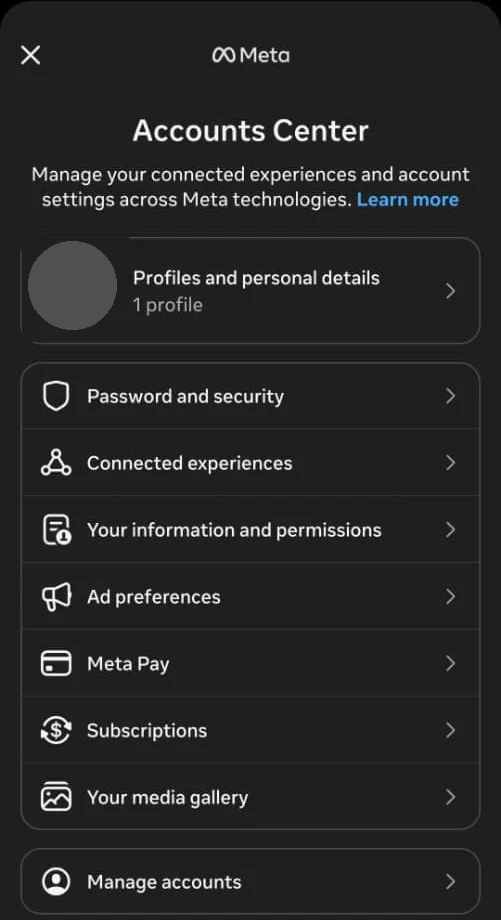
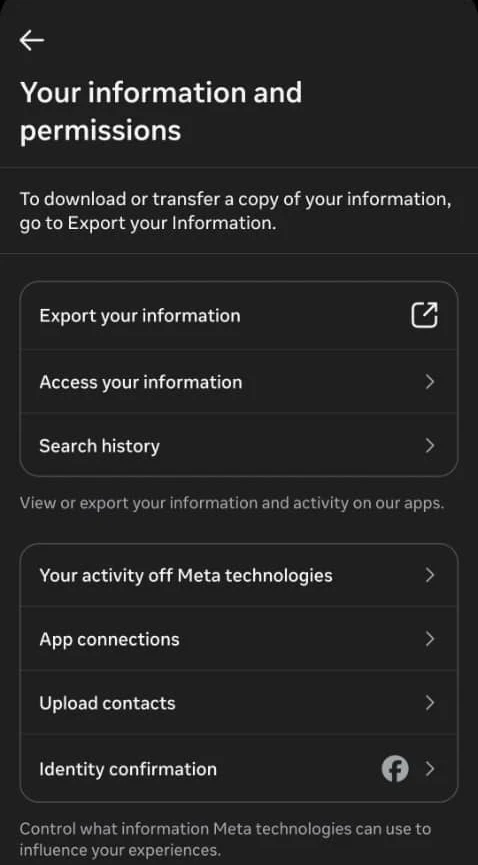
Did it work? Meta notifies you when the export is ready to download.
Did Fix 1 solve it?
Great, you fixed it with Fix 1. Tell us it worked, or bookmark this page in case it happens again.
Fix 2: Export on a computer
Meta points to the Export your information tool in Accounts Center.
Computer (browser)
- Open the Export your information tool in Accounts Center (external site, opens in a new tab) (Your information and permissions > Export your information).
- Click Create export and follow the same choices as in the app.
Facebook deactivated? Use the Messenger-only steps instead.
Did it work? Your export appears in the list and is ready to download when Meta notifies you.
Did Fix 2 solve it?
Great, you fixed it with Fix 2. Tell us it worked, or bookmark this page in case it happens again.
Just want to look, not download?
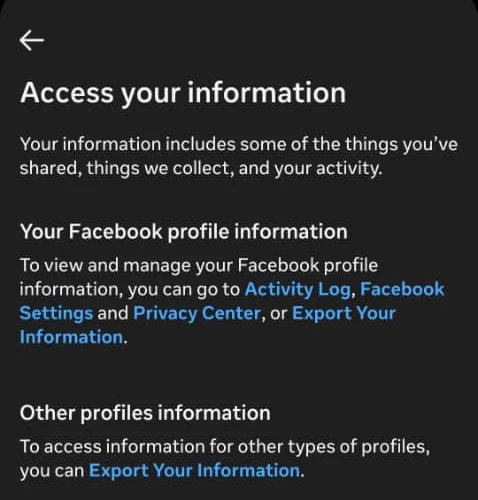
On Android in November 2026, Your information and permissions also had Access your information. It says your information includes “some of the things you’ve shared, things we collect, and your activity,” and points to Activity Log, Facebook Settings, Privacy Center and Export Your Information. The same menu has Search history, Your activity off Meta technologies, App connections and Upload contacts.
Send the copy to an external service
- In Export your information, tap Create export and select your profile.
- Select Export to external service, choose the service and tap Next.
- Connect to the service you chose.
- Choose how often to export and tap Next.
- Enter your profile password and tap Next.
- Customize the export, notification email and media quality, then tap Start export.
Messenger-only account (Facebook deactivated)
Meta calls this a Deactivated Except Messenger Account (DEMA). To get your data, on a computer:
- Open messenger.com.
- Click your profile picture (bottom left), then Preferences.
- Click Export your information.
- On the page that opens, click Create export.
See use Messenger without Facebook for how DEMA accounts work.
How to know it worked
- You have a downloaded export, or it’s been sent to the service you chose.
Still not working? Your next steps
- Encrypted chats missing from Messenger itself? Restore them first: see Messenger chat history missing. Deleting your account? See deactivate or delete Facebook.
Official help routes
SocialAppFix can’t see or change your account. For account decisions, recovery and appeals, only the platform’s own tools can help. These links go to the official sites.
Frequently asked questions
How do I download all my Messenger messages?
Meta says go to Menu > Settings > See more in Accounts Center > Your information and permissions > Export your information > Create export, then Export to device.
Can I download Messenger data if my Facebook is deactivated?
Yes. Meta says on a computer, open messenger.com > profile picture > Preferences > Export your information > Create export.
Can I send my Messenger data to another service?
Yes. Meta offers Export to external service: choose the service, connect it, set how often, enter your password and start the export.
Did this solve your problem?
Your answer stays in your browser — nothing is sent or stored. The “tell us” link opens your own email app.
Out of date or didn’t work? Email us — never include passwords or codes.
Sources and how we checked this guide
We base steps on the platforms’ own help pages and the phone makers’ official guides. Menu names change often and can differ by device, app version and region. Where a platform page could not be independently read, we link it so you can check the current wording yourself.
Last reviewed 7 November 2026 by the SocialAppFix editorial team against the sources above. Next scheduled review: 7 May 2027. Editor: Michael Michael. How we write and review guides.
What changed
- 11 November 2026: Added Android screenshots of Accounts Center and Your information and permissions, and the Access your information page.
- 7 November 2026: First published.
SocialAppFix is an independent guide and is not affiliated with or endorsed by Meta or Messenger. We never ask for passwords, login codes or payment to fix an account.